if ($("#pizza").is(":checked")) {
     $('#pizza_kind').prop('disabled', false);  // enable
}
else {
     $('#pizza_kind').prop('disabled', 'disabled');  // disable
}

dizzy03 發表在 痞客邦 留言(0) 人氣()

關閉
$('#confirm').modal('hide');
開啟

dizzy03 發表在 痞客邦 留言(0) 人氣()


轉自 https://www.welcometw.com/youtube-影片下載|免費下載影片的線上工具/
--
 

dizzy03 發表在 痞客邦 留言(0) 人氣()


Excel 凍結窗格、鎖定欄或列教學,固定標題不捲動


dizzy03 發表在 痞客邦 留言(0) 人氣()


官網文件:
https://phpspreadsheet.readthedocs.io/en/latest/topics/recipes/#formatting-cells
使用方法:
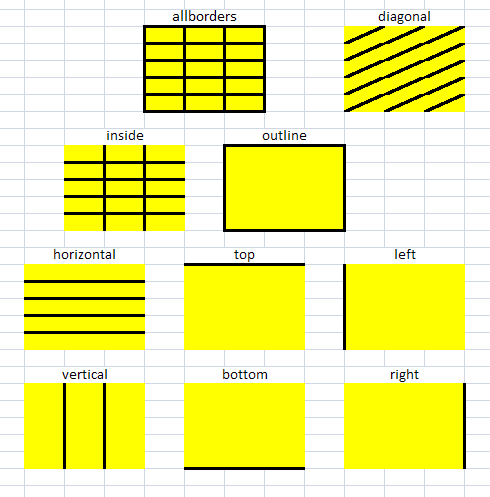
1. 先設定styleArray

dizzy03 發表在 痞客邦 留言(0) 人氣()

dataTable的卷軸呈現是在dataTable的參數裡頭設定
不用在CSS那邊處理
--

dizzy03 發表在 痞客邦 留言(0) 人氣()


其實就是在網頁版或PC版 telegram中,把show sensitive contents選項開啟。
這個選項iOS APP中不存在。
--
Telegram,也就是我們所說的電報,是當前最流行的社交APP,很多網站、品牌和公眾人物都擁有自己的“電報群”。開放的群組和頻道是Telegram 最具特色的功能,也是很多用戶(包括我)使用Telegram 的主要目的。

dizzy03 發表在 痞客邦 留言(0) 人氣()


1、$.ajax() 一般用法


$.ajax({
url:"/demo/test.do",
type:"post",
timeout:15000,//超时时间
beforeSend:function(XMLHttpRequest){
$("#loading").html("<img src='/jqueryStu/images/loading.gif' />");
},
success:function(data,textStatus){
console.log('开始回调,状态文本值:'+textStatus+' 返回数据:'+data);
//开始遍历data的值
for(var i=0;i<data.length;i++){
}
},
complete:function(XMLHttpRequest,textStatus){
console.log('远程调用成功,状态文本值:'+textStatus);
$("#loading").empty();
},
error:function(XMLHttpRequest,textStatus,errorThrown){
console.log('error...状态文本值:'+textStatus+" 异常信息:"+errorThrown);
$("#loading").empty();
}
});

說明:


  • success 只有在AJAX調用成功時才會觸發,即最終返回HTTP 200狀態。

  • error 請求失敗;

  • complete 請求結束,則會觸發,無論成功與否。


2、 $.ajax().done()


從JQuery 1.8,$.ajax()的success() 被替換為done() ,error() 被替換為fail() ,complete() 被替換為always() 。


function test(){ 
$.ajax({
type: "post",
url: "/exportUploadUserDetailCount",
dataType: "json",
}).done(function(data){ // 相当于 success
console.log(data)
if(data.result){
result = data.result;
}
}).fail(function(jqXHR, textStatus, errorThrown){ // 相当于 error
}).always(function( jqXHR, textStatus ){ // 相当于 always
});
}


dizzy03 發表在 痞客邦 留言(0) 人氣()

Q: 如何使用PHP Spreadsheet做rowspan或colspan
A: 使用mergeCells() function
ex: 
$objPHPExcel->setActiveSheetIndex(0)->mergeCells('A1:A3');

dizzy03 發表在 痞客邦 留言(0) 人氣()

許多情況下,我們需要刪除整個資料表內的資料,重新輸入新資料,有三種方法可以參考使用,分別是使用Delete、Trancate與Drop,那使這三種方式的差異為何呢?
一、使用Delete :
使用Delete語法,不加任何Where條件下,是可以移除整個Table的資料,這個方式簡單易懂,但是卻會耗用大量資源,因為Delete語法:
1.Delete屬DML命令,不加任何Where條件下,會一筆一筆的移除資料列,且在交易記錄中每筆刪除的資料,都會記錄成一個項目,當整個Table的資料移除完時,已耗用許多時間。

dizzy03 發表在 痞客邦 留言(0) 人氣()

$ch = curl_init();

curl_setopt($ch, CURLOPT_URL,            “http://yourdomain.com.tw” );
curl_setopt($ch, CURLOPT_RETURNTRANSFER, 1 );
curl_setopt($ch, CURLOPT_POST,           1 );
curl_setopt($ch, CURLOPT_HTTPHEADER,     array(‘Content-Type: text/plain’)); 
curl_setopt($ch, CURLOPT_POSTFIELDS,     “POST RAW 資料” ); 


$result=curl_exec ($ch);

dizzy03 發表在 痞客邦 留言(0) 人氣()

轉自 https://dotblogs.com.tw/jses88001/2014/08/10/146222
--
 

dizzy03 發表在 痞客邦 留言(0) 人氣()

Blog Stats
⚠️

成人內容提醒

本部落格內容僅限年滿十八歲者瀏覽。
若您未滿十八歲,請立即離開。

已滿十八歲者,亦請勿將內容提供給未成年人士。